

Product announcements

Product Announcements from Crafted Call.

Follow new launches, feature expansions, and product thinking for call for artists software, jury review, exhibitions, gallery websites, email marketing, artwork sales, and more.

Latest update
November 23, 2026
Written for
Gallery teams
Includes
Launches, expansions, quality
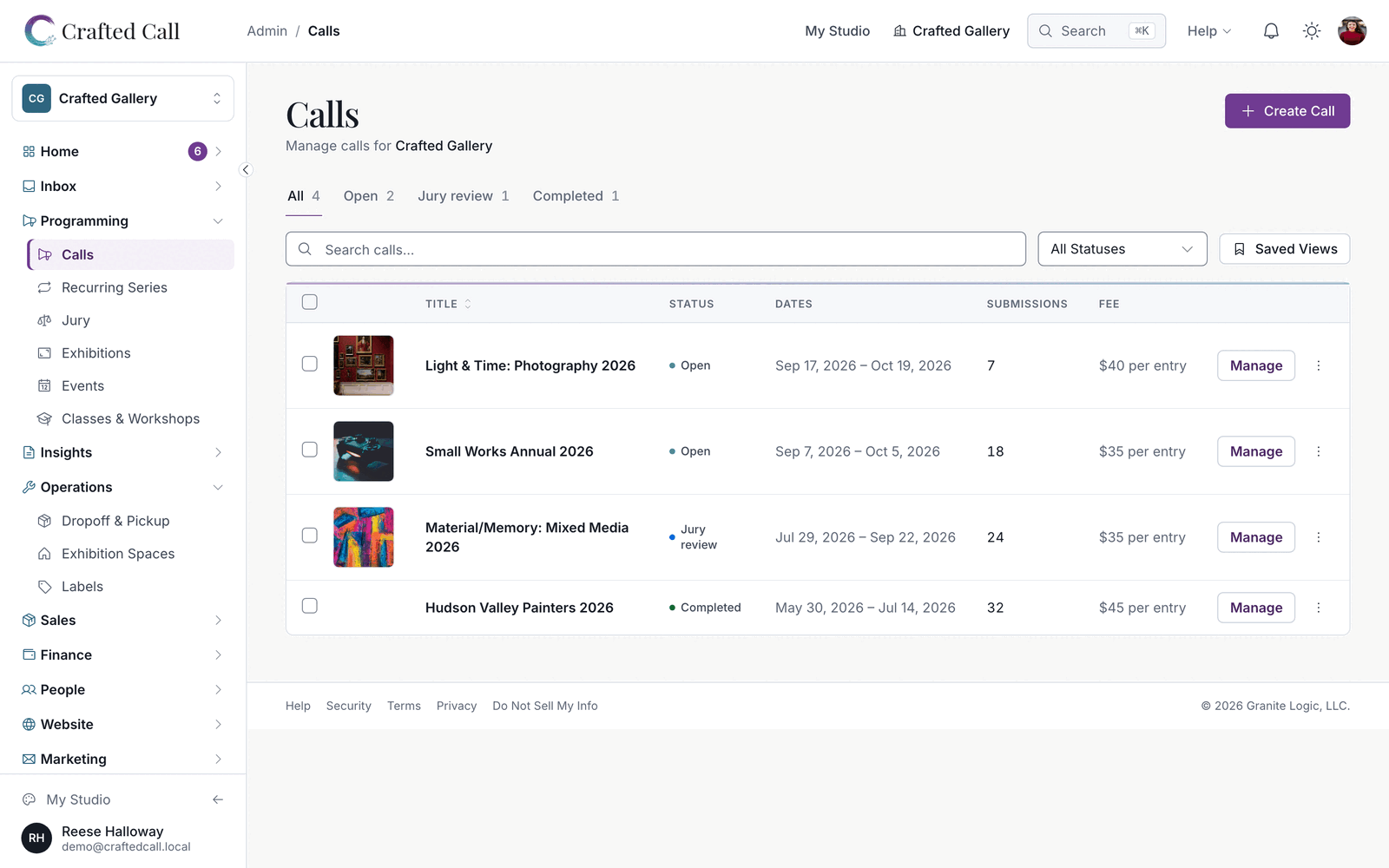
Crafted Call calls dashboard showing call statuses, submission counts, deadlines, and quick actions.

Page 9 of 24. Back to the latest announcements

Quality announcement

Preview letters, draft newsletters, and browse embedded works

You can preview Mixed Acceptance letters, keep the fees when saving a call template, and ask Frida to draft a newsletter from what is coming up at your gallery. Embedded galleries let visitors browse individual artworks without leaving your website. Checkout rechecks submissions before recording payment, the desk lists work an open show expects back, and personal image and profile permissions are clearer.

LaunchedMarketing teams

Ask Frida to draft your next newsletter

Ask Frida for a newsletter covering the coming days or weeks, and it draws from exhibitions on view, upcoming events and classes, and calls still open. It creates a draft for you to review and sends nothing on its own. If there is nothing to include, it tells you rather than creating an empty draft.

LaunchedExhibition teams

Browse artworks without leaving your website

Embedded galleries open individual exhibition artworks inside the frame, with their image, details, price and artist information. Visitors can inquire, browse the next work or return to all works without leaving your website. Buy opens the hosted artwork page in a new tab. Existing inventory item links keep opening in a new tab.

ExpandedCall admins

Preview the letter your artists will receive

You can preview the Mixed Acceptance letter before sending, and the letter editor opens on the template your call will actually use. Built-in decision letters now list each work on its own line, with warmer wording and show details in clear paragraphs. Your saved templates keep their precedence, and saving changes only the fields you edited.

ExpandedCall admins

Keep your fees when saving a call template

Save as Template keeps your fee model, prices, payment terms, member discount and sliding scale. The Fees step also loads and saves the discount and sliding scale, so you can reuse those choices for your next call.

NoteArtists

Review your image and profile drafting permission

Your personal image and profile setting is clearer about what it controls, including image descriptions, your Artist Site biography and profile analysis. If you previously turned it on, you need to turn it on again under the updated wording. Organizations you submit to can use drafting tools with submitted material for their own calls and shows, including catalog text and press releases, separately from that personal setting.

QualityArtists

Pay only for submissions that are still eligible

Resume Checkout and Finish payment check each submission again before opening payment. Withdrawn, archived, deleted or already-submitted work cannot be paid for, and a stale payment that goes through requests a refund for that work and explains why. When your gallery has no card on file to cover a platform charge, the call page and artist checkout explain who pays until a card is added.

QualityExhibition teams

Receive picked-up work an open show expects back

For work linked to a call, an early pickup while its show is still open returns it to the desk's expected list, even when the call has no end date. Staff can record it as dropped off again, and it stays hidden from the public exhibition until it is received. The exhibition banner names hidden works that are missing from the desk list so you can check their submissions.

QualityGallery admins

Save clearer text and keep pages usable

Names and titles keep their ampersands and quotes, and CSV imports reject overlong call and submission text before importing. Closing a dialog or menu restores page interaction when no other modal is open. Exhibition creation names accepted work omitted for missing images, failed catalogs explain why, and Works pagination returns visitors to the list.

Product announcement

Group each artist's results into one decision email, choose when followers hear about an exhibition, and charge entry fees on private calls

When you send a call's results together, each artist's entries in that send are grouped into one email, with a Mixed Acceptance letter when their results differ. You choose when followers are told about an exhibition, private calls can charge an entry fee, and new entry-fee checkouts no longer ask for a phone number. Payment totals name the dates they cover, and events, 1099s and images are steadier too.

LaunchedCall admins

Group each artist's results into one decision email

When you send a call's results together, each artist's entries in that send are grouped into one email. Matching results use their result letter; different results use the Mixed Acceptance letter, which lists what was accepted and what was not, then gives the drop-off and exhibition details once. Edit it beside your Accepted and Rejected emails, and wrap words in two asterisks to make them bold.

LaunchedExhibition teams

Choose when followers hear about an exhibition

Each exhibition now has a Follower announcement panel. Preview the email your followers will get, then send it now, schedule it for a date and time on your gallery's clock, reschedule it or cancel it. The panel shows delivery progress once it starts sending, and Frida can do the same for you.

ExpandedCall admins

Charge an entry fee on private, invite-only calls

A private call can now charge an entry fee, and invited artists pay it at checkout like any other call. Call pages list your requirements once, in full. When an artist reaches a call's limit, the page explains which saved drafts count toward it, and the limit is checked before checkout.

ExpandedArtists

Pay an entry fee without a phone number

New entry-fee checkouts no longer ask for a phone number. Artists fill in their card and billing details and pay, whether they check out from their cart or from a payment link you sent.

ExpandedGallery admins

See the dates behind your payment totals

Totals on the Payments and Bank Deposits pages now show the dates they cover, and submission fees appear under one name in the transaction breakdown. If your gallery takes payments in more than one currency, Finance Overview, donations and pending payouts total each currency separately, and invoices are labelled in your organization's currency.

NoteExhibition teams

Publishing an exhibition no longer emails followers

Publishing or opening an exhibition used to email your followers right away. Now nothing is sent until you approve it in the exhibition's Follower announcement panel. Existing exhibitions start Not scheduled, and no announcement is sent automatically.

QualityEveryone

Quality work across events, 1099s, images and settings

Event sessions show as full from their own seats, and volunteer waitlist promotions respect required waivers and filled roles. For US galleries, sending 1099s in bulk skips forms already sent. Older call posters and artwork images load again, switching organizations shows a loading screen until the new workspace is ready, and Preferred opening day is back in organization settings. Exhibitions can be deleted from the Danger Zone at any lifecycle stage when they have no held works, active checkouts, recorded sales or payout batches. Shows with sales or payout history remain available. This release also carries security and reliability improvements.

Product announcement

Collect details for each work-sample image, show jurors artists' answers, and see every sale in your finance reports

Calls that collect work samples can ask for a title, medium, size, year and price on each image, and jurors now see those details beside each artist's answers to your call's questions. You can choose where artists answer your questions, finance reports include every kind of sale net of refunds, and each artist gets their own 1099. Refunds, jury reviews, exhibition editing and checkout are steadier too.

LaunchedCall admins

Ask for a title and details on each work sample

Calls that collect work samples can now ask artists for a title, medium, size, year and price on each image. Turn it on in the call's Entry settings under Details for each image. Jurors see the details beside each image in review, meeting mode and the compare view, and staff see them in Quick View.

LaunchedJury teams

Show jurors the artist's answers to your questions

Jurors now see each artist's answers to your call's questions beside the artwork, in the review screen and the full-screen viewer. A proposal, statement or artist note is read alongside the work it describes.

ExpandedCall admins

Choose where artists answer your call's questions

Under Form & Questions, choose whether artists answer your questions on the same page as their work details or on a step of their own. Automatic keeps the layout your calls use today. Web addresses in a question's instructions are now clickable links for artists.

ExpandedGallery admins

See every sale and refund in your finance reports

Profit & Loss, Revenue Summary, Tax Summary and Cash Flow reports now include submission fees, donations, tickets and memberships, net of refunds, with refunds on their own line. Finance Overview totals and the Activity export count every transaction in the period, and the Sales Tax report counts charged orders and lists exempt sales separately.

ExpandedGallery admins

Send each artist their own 1099 form (US)

For US galleries, every artist on the 1099 page gets their own form, even when two artists share a last name. A row's Send sends only that artist's form and reports how many were sent, failed or skipped, and a row's Download opens the PDF.

NoteOrganization admins

Use a key with write access to automate changes

A personal API key created with read access only can view your organization's data but cannot make changes, such as creating webhooks or sending decision emails. To automate changes, create a key that includes write access for your organization.

QualityEveryone

Quality work across refunds, jury reviews and checkout

Cancelling a call or refunding a partly refunded submission returns the remaining balance, and artists who paid by cash or check are told you will return their fee. Jurors' votes and scores wait on the device until they send, and saving exhibition details keeps a colleague's changes to other fields. Artists who leave the payment page can cancel and change their cart right away, Frida reschedules events on your gallery's clock, and the Orders summary totals the organization you are viewing.